The jukebox in your browser: Juqed Web for Windows, Linux or Mac
Published on
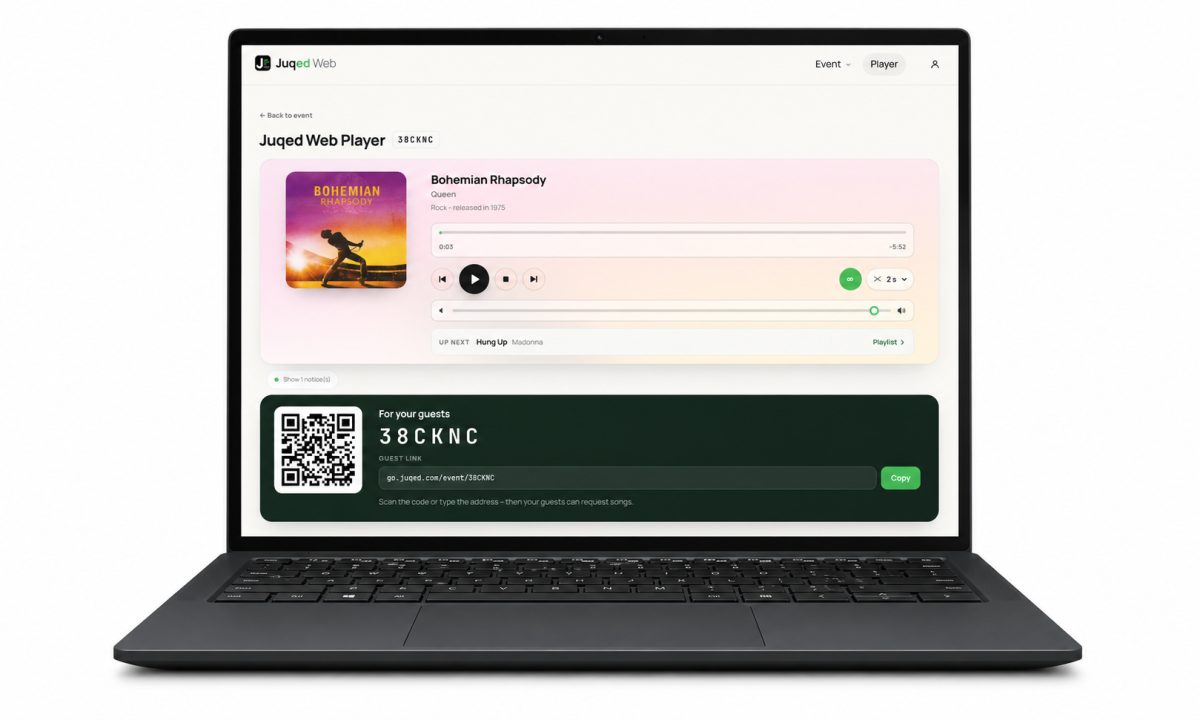
What Juqed Web is: the jukebox in your browser
Juqed Web is a party jukebox that runs entirely in the browser. The host creates an event on a web page and shares a link or a QR code. Guests open it on their own phones, search the music catalogue, add songs to the playlist and vote on what everyone else requested. Whatever has the most votes plays next. Playback happens in the host’s browser window, through their own music subscription.
That removes what usually makes such evenings complicated: there is nothing to install, no extra device to connect and no rig to set up. The computer already standing in the room is the sound system.
System-independent: a party jukebox for Windows, Linux or Mac
Juqed Web is tied to no operating system and no manufacturer. It is a website, not software – open the address, sign in with an email address, create an event. No download, no installation, no system requirements to puzzle over. On Windows, on Linux and on the Mac it is the same edition with the same feature set.
That shifts the decisive question. It is no longer which device is in the household or who made it, but simply: will a computer be switched on in the room that evening anyway? At most parties the answer is yes – the office machine, the notebook on the sideboard, the till behind the bar.
Guests are tied to nothing either: their page opens in the browser of any smartphone, Android or iPhone, and on tablets just as well.
How the browser jukebox works
The setup is kept short, because on the day of the party nobody wants to read instructions:
- Sign in. An email address is enough; access arrives as a six-digit code by mail. No password is needed, and there is no separate registration step – the account is created with the first sign-in.
- Create an event. One click produces an event code, a QR code, a guest link and a ready-made A4 poster as a PDF to print.
- Connect the music. On first start the host signs in to their music service once. After that the player plays in the browser tab that stays open.
- Share it. Show the QR code, send the link or lay the poster on the tables. From there the guests take over.
From the first address to the first song takes a few minutes – even while glasses are still being handed round.
Guest song requests with no app, no account and no shared Wi-Fi
The essential part does not happen on the host’s computer but on the guests’ phones. They scan the QR code, the browser opens, they pick a name – done. No download, no account, no email address and no music subscription of their own.
A shared Wi-Fi network is not required. Guests can be on the network or on mobile data, mixed and changing through the evening. That removes the usual opening ritual of every party – dictating a Wi-Fi password to twenty people.
What guests can do: search the catalogue, request something and vote for what others requested. The playlist sorts itself – by what the people present want to hear, rather than by whoever speaks loudest.
Letting everyone join in is not losing control
The most common worry among hosts is that someone will take over the evening. Several settings work against exactly that, all on one page and changeable at any time, even mid-event:
- The blocklist. Artists or terms that must not play can be entered. Anything listed can neither be requested nor played by the Auto DJ, and it does not even show up in the guests’ search.
- Fair rules. A wait between two requests, a maximum of open requests and votes per guest, no voting for your own request, no title twice in the list.
- Vote ageing. Requests that have waited a long time move up by themselves, so quieter guests get their turn too rather than only the clear majority.
- The Auto DJ. When nothing is requested, Juqed Web keeps playing – in keeping with what already played, by genre, from the host’s own playlists, from curated collections, or in DJ mode, which picks the order by mood. Silence does not happen.
On top of that comes direct access: drop in songs, play a track right away, skip, pause. The host sets the frame; the guests fill it.
What hosts need – and what they don’t
Two things are required. First, a computer that stays on during the event – the tab with the player has to remain open while music is playing. A phone will work, but unreliably: once the screen locks, playback stops. For a whole event a computer is the safe choice. Second, an own paid Apple Music subscription, because that is where the music comes from. Guests need none.
Not required: a rig to set up, an extra device, an app for hosts or guests, a shared network – and no playlist prepared in advance. Requests come from the complete catalogue, not from a list someone had to assemble beforehand.
Where the browser jukebox fits best
Anywhere more than one person wants a say and a computer is present regardless:
- House parties and birthdays. The laptop is by the speakers anyway. Instead of one person managing the music all night, everyone requests for themselves.
- Weddings. Different generations, different taste. Instead of a fixed set list the party itself decides what plays next – nobody has to host the music.
- Club and village festivals. One computer at the bar, one printed poster on every table. The blocklist keeps out whatever does not belong at a family event.
- Bars, cafés and restaurants. The computer behind the counter is running regardless. Guests can have a say without approaching the staff.
- Company parties. Music nobody feels left out of – and nobody has to explain why their playlist is the one running.
Free to try
Juqed Web can be tested without payment details. The free tier includes every feature – requests, voting, blocklist, history, the guest page and all Auto DJ sources. Only time is limited: an event runs for one day, and playback is capped at a few hours, counted from the first song played and once per account.
Setting up costs none of that: connecting the music, choosing a source for the Auto DJ and testing it with a phone as a guest can all be done at leisure – the clock only starts once music has actually played. Anyone who needs to work without those limits takes Juqed Gold; events then run with no end date until they are ended. Current terms are on the pricing and refunds page, and cancellation is possible at any time with no notice period.
Data and privacy
Guests create no account and hand over no email address – only the name they appear under in the list is stored, along with their requests and votes. There is no advertising and there are no trackers. The servers are in Germany. Once the event is ended, the playlist, the history and the guests’ requests are deleted.
How to start an event in the browser
Nothing beyond a browser is needed. Juqed Web runs on Windows, on Linux and on the Mac: open the page, create an event, share the link – and the guests take over the music. A full overview is on the Juqed Web product page, and every step is explained in the guide.
