The Playlist on the Wall: Show Your Party Playlist on TV
Published on
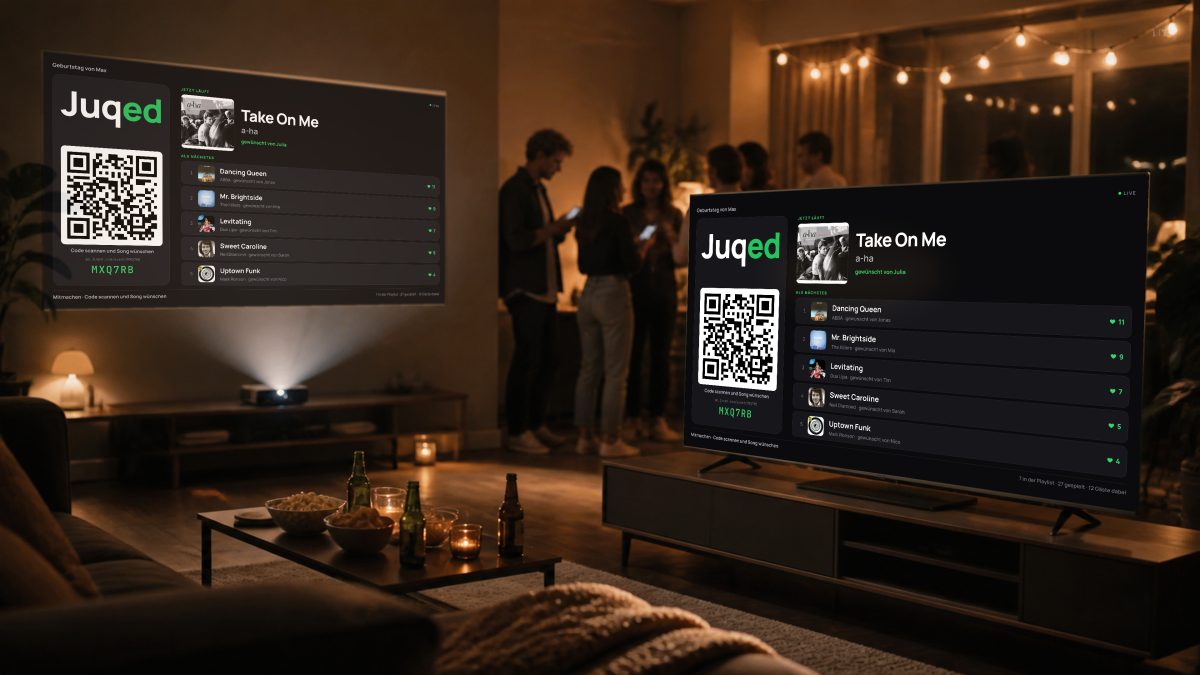
At every party I have run with Juqed Go, the same two questions come up all evening: “How do I join?” and “What is this song called?” Both of them now answer themselves — on the biggest screen in the room. The new feature is called the Screen, and it turns any TV, projector or spare monitor into a display board for your night.
Your party playlist on TV: how the Screen works
A quick primer in case Juqed Go is new to you: it is a jukebox for events. Your guests pick the music from the browser on their phone — no app to install, no shared Wi-Fi, no sign-up. They scan a QR code, request songs and vote on what plays next, while you as the host stay in control of playback.
Until now, all of that lived on the phones in the room. With the Screen you also open the guest page on a large display — and the room knows what is going on. Large and readable from anywhere, it shows:
- the QR code to join, big enough for the whole room
- what is playing right now, with artwork and the name of the guest who requested it
- the songs coming up next, with their votes
- a live ticker: “Julia requested Take On Me”
The requester's name is up on the wall
If I had to pick one detail of this feature, it would be that one. A display that only names the track is information. A display that shows who asked for it is a reason to join in.
I saw it again and again during test nights: the moment the first name appears on the TV, people reach for their phones. Not because they desperately want a different song, but because they want their turn up there too. Choosing music stops being a silent act and becomes something the room notices — and that is the difference between a playlist that plays and an evening everyone takes part in.
What you need for it
Honestly: nothing extra. The Screen is not another device and not a second app, just an address in a browser. Anything with a browser works — the smart TV in the living room, a laptop on an HDMI cable, a projector in a function room, a tablet on the bar.
- Light or dark, depending on the room — for a dimmed party as much as for a bright café in the afternoon
- The display stays awake by itself, no screensaver in the middle of a chorus
- Works for hosts using the app and for hosts on Juqed Web
At home, at the bar, at the club night
The Screen earns its keep wherever guests arrive and leave throughout the evening. At a birthday party, the friend who turns up at eleven can see instantly how to join in. In a bar, the display replaces the table card nobody reads anyway. And at a function room night, the projector makes sure the question about the song title never gets asked in the first place.
The Screen is available now — try it at your next event and see how long it takes before the first guest spots their own name on the wall.
Reference: How screen mode works.
