The evening carries your name.
A guest scans a code and lands on a page. Whether it is the right one should be visible, not something they have to ask about. So host and occasion sit in every event — and with Juqed Gold your logo stands beside them: on every guest's phone and large on the wall.
Three entries, one sentence.
- Host — the name in the sentence. A person, a family, a company.
- Occasion — from a list: birthday, wedding, corporate event, anniversary, Christmas party, summer party, club event and nine more.
- Logo or photo (with Juqed Gold) — the image beside the sentence. A company logo, a club crest, the couple's photo, a picture of the person being celebrated.
- The first two become the sentence your guests read: “Corporate event by Kranz & Vogel”. Both are optional, and they do not depend on each other — a logo without a name works, a name without a logo too.

The first glance answers the first question.
A code on a table says nothing about where it leads. Whoever scans it has a moment of doubt: does this belong to this party? If the page that opens carries the logo and “Corporate event by Kranz & Vogel”, that question is answered before anybody asks it — and nobody has to hunt down the host to settle it.
And not only at the start. The image stays in the bar above the search, while they type and on the playlist and history tabs. Put the phone down, pick it up an hour later, and you are back at this party rather than in some music app.
When the evening is over, it appears on the closing screen too.
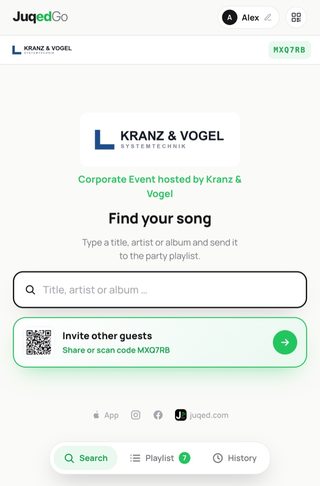
Two surfaces, one image.
The phone in their hand and the screen in the room show the same logo. That is what recognition is made of: what somebody sees on the wall they find again in their hand — and whoever looks at their phone knows which screen in the room belongs to it.
On the screen the image gets the whole left column. The album artwork that usually sits there steps aside the moment a logo is set: two large pictures side by side compete for attention, and yours should win. The current track still stands large next to it, and every guest sees the artwork on their own phone anyway.
Juqed takes a step back without disappearing: our wordmark stays above the QR code, so a guest knows what they are dealing with and where to read up afterwards.
The staff party looks like your staff party.
At a staff event the room belongs to the company: the sign at the entrance, the cards on the tables, the screen at the front. If the music runs on a jukebox, then without a logo the one surface everybody looks at is the only part of the evening that looks like somebody else's tool. An image turns that around: your brand is in front, Juqed is the tool behind it.
There is also a hurdle that genuinely exists inside companies: staff are trained not to scan codes they do not know. A logo is not proof — but it removes the hesitation in the moment before, because the page looks like it belongs to the event. And that decides whether people join in: someone who hesitates requests nothing, and an evening where nobody requests anything is canned music again.
A photo does the same job as a logo and often fits better: the team picture, the new site, the number on an anniversary. Nothing is cropped; landscape, portrait and square are all correct.
Anyone running events for other people has a practical reason on top: the image belongs to the event, not to the account. Next week a different client, a different logo — and nothing to clean up, because the image goes when the event does. For an IT department that is the short answer to how long the company logo sits there: as long as the party.
The logo is part of Juqed Gold — along with everything else in it.
One frame, three shapes.
- Landscape, portrait or square — all three are accepted and never cropped. A company wordmark is almost always wide; it stays intact instead of being squeezed into a square.
- PNG, JPEG or WebP — up to two megabytes. Whatever you upload is resized once to screen size; only that version travels to your guests.
- The plate behind it — light, dark or none. A dark logo on a transparent background would vanish on the near-black screen, a white one on the bright guest page. A plate solves both, and you never have to prepare a second version of your logo.
- A preview before you save — you see it exactly as it will look on a guest's phone and on the screen, before anybody else does.
“Personalise event”, in both versions.
In Juqed Go the path runs from the event tab into the event details; the screen is called “Personalise event”, and the logo comes straight from your iPhone or iPad photo library. In Juqed Web the same section sits on the event page: pick a file or drop it in.
Host and occasion are there for everyone, in every event. The image belongs to Juqed Gold — without a subscription the row is still visible, carrying a lock rather than being hidden, so you know it exists.
You can change any of it mid-event. A new image replaces the old one, and your guests see it without reloading the page.
What people ask about the logo.
Who can add a logo?
Anyone can set the host and the occasion, in every event. The image belongs to Juqed Gold — in Juqed Go and Juqed Web alike.
Do I have to crop my logo first?
No. Landscape, portrait and square are all accepted and placed in the same frame, with nothing cut off.
My logo has a transparent background. Will it vanish on the dark screen?
No, that is what the plate behind it is for: light, dark or none. A dark logo gets a light plate, a light one a dark plate — you never need a second version of your logo.
Where do my guests see it?
On their phone in the bar above the search, on every tab and while they type; large on the start screen until they search for something; on the screen view beside the event name; and at the end on the closing screen.
Can I use a photo instead of a logo?
Yes. A team picture, the couple's photo, a picture of the person being celebrated — technically it is the same thing, and nothing is cropped here either.
What happens to the image after the event?
It is deleted along with the event. There is no archive it could resurface from, and for the next event you upload it again — for an agency it is a different one anyway.
Which files can I upload?
PNG, JPEG and WebP up to two megabytes. Moving images are not accepted: a logo that jiggles on the screen pulls attention away from the music.
Your name, your evening.
Host and occasion come with every event. The logo or photo arrives with Juqed Gold — on every guest's phone and large on the screen.